POKÉMON RED · BLUE · YELLOW
Catch all 151.
Never lose a save.
A guide that routes the game around your goals and your save file — and a save editor that keeps every upload as a version, like Git for your cartridge.


PILLAR 1
A guide that knows where you are
Pick a goal — a badge, a handful of Pokémon, or all 151 — and the route rebuilds itself around what you have already caught. Drop in a .sav and it picks up exactly where your cartridge is.
 #084 Doduo — Routes 16-18 grass
Caught ✓
#084 Doduo — Routes 16-18 grass
Caught ✓
PILLAR 2
Git for your cartridge
Every upload is kept as a version — browse it, compare it, download it. Edit money, badges, party and boxes; edits follow the real Gen 1 formulas and save as a new version.
How it works
Three steps between you and a full Pokédex.
01
Start a playthrough
Pick Red, Blue or Yellow and set its goals — a badge, a handful of Pokémon, or all 151. Change them whenever you like.
02
Follow the guide
It routes you to your goals and says when something needs a trade, another version, or a one-per-save choice.
03
Sync your save
Tick catches by hand or upload your .sav at any time — the app reconciles both, and keeps every upload as a version.
THE GUIDE
Not a walkthrough. Your walkthrough.
Your route — 36 steps · you are at step 21


Save editor — Party
 #005 Charmeleon
Lv. 30
REPTINCEL
#151 Mew
Lv. 51
MEW
#005 Charmeleon
Lv. 30
REPTINCEL
#151 Mew
Lv. 51
MEW


 4 badges · 696,969₽
Save as a new version
4 badges · 696,969₽
Save as a new version
THE SAVE EDITOR
Edit anything. Break nothing.
STRAIGHT FROM THE ROM
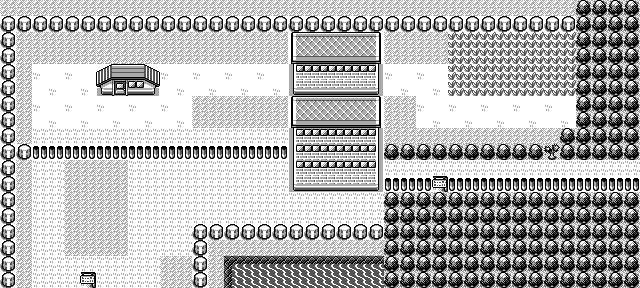
Every encounter, level, evolution and price in the guide is checked against the pret disassembly of the games themselves — not copied from a wiki. The maps are rendered from the game's own tile data, and the save parser works on offsets verified the same way. When the guide says a Doduo is in that patch of grass, it is because the ROM says so.
Questions, answered
Does it work with emulators and real cartridges?
Yes. Any 32 KiB Gen 1 battery save works: emulator .sav files, cart dumps from a GB Operator and friends, and 3DS Virtual Console saves. French and English games both work — species are stored as numbers, so the language of the cart makes no difference.
Is editing my save safe?
Saving always creates a new version, so the original file stays in your history untouched and one click from download. Pokémon you do not edit keep their exact bytes, and everything else follows the game's own formulas and checksums.
Do I need to upload a save to use the guide?
No. You can tick catches by hand and the route adapts the same way. The .sav upload is a shortcut, not a requirement.
How does all 151 work on one cartridge?
It cannot be done alone — Gen 1 needs trades. The guide works out which picks are impossible on your version, suggests companion runs on the others, and tracks the trade-ins so you know what is still owed.
Read the full answer →Where does the guide's data come from?
From the games. Encounter tables, evolution levels, Game Corner prices and save file offsets are all verified against the pret disassemblies of Red, Blue and Yellow. Sprites come from PokéAPI; maps and badges are rendered from the games' own tile data.
Read the full answer →How do I get an account?
Ask for one. Sign-ups go into a queue and are approved by hand, usually within 72 hours — you will get an email as soon as yours is open.
Ready to finish the dex?
Pick a version, pick a goal — the guide takes over from there.
Request an account